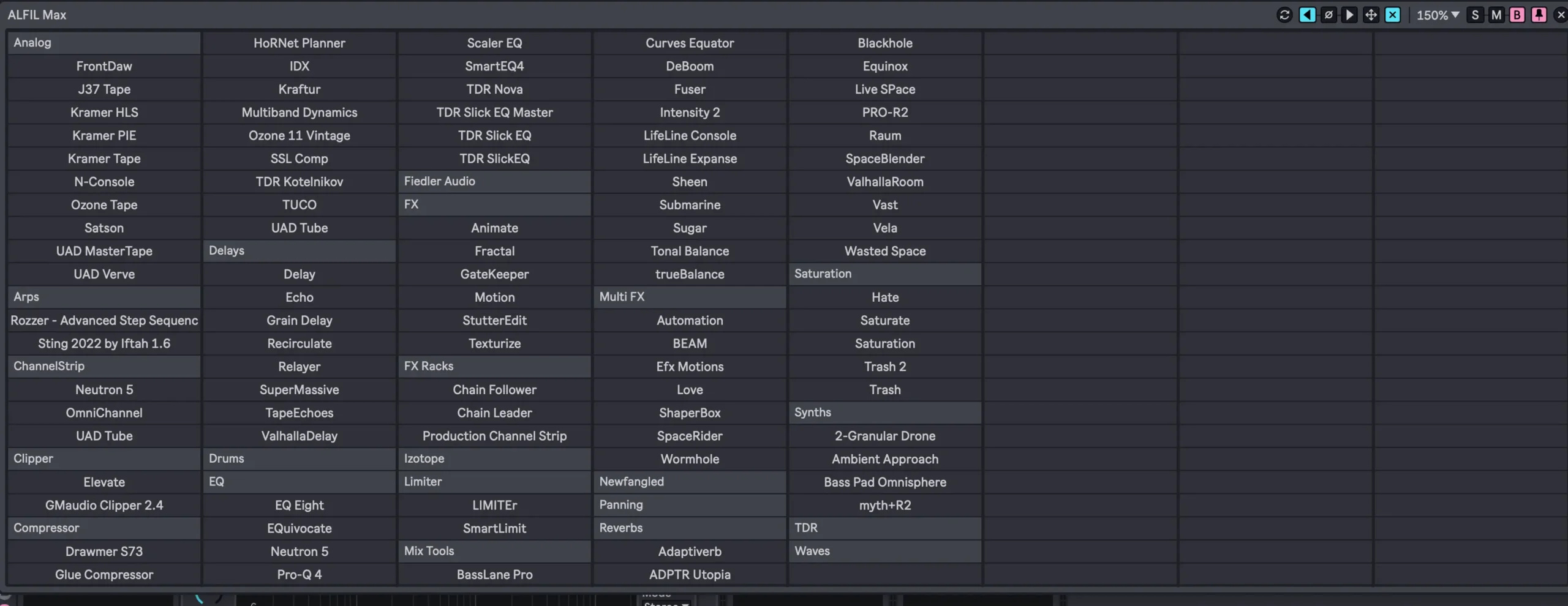
Ableton Live’s built-in browser is decent for finding effects and devices—but if you’re looking for faster, one-click access to your go-to FX racks, plugins, and presets, ALFIL Max is a no-brainer. This Max for Live device works like a supercharged, customizable FX launcher.
What is ALFIL Max?
ALFIL (Ableton Live Fast Item Loader) is a Max for Live utility that reads directly from your drive and lets you trigger FX racks, instruments, devices, and plugin presets with a single click—no more digging through folders.
It’s a smart extension of Ableton Live’s browser, designed to make your most-used tools instantly available in the session view, or via a floating window.
Key Features
- ⚡ One-click access to .adg, .adv, .als, .amxd, .aupreset, and .vstpreset files
- 📂 Reads files directly from disk, always up-to-date
- 🧱 Custom folder structure: organize by category (e.g., “Delays”, “Master FX”)
- 🪟 Floating window (48, 96, or 192 slots) for quick access—mappable to key commands
- 🎯 Insert FX before/after a selected device or at end of chain
- 🪟 Works on both Windows and macOS (note: mac users need a couple extra components installed)
- 🎛️ Multiple instances per project for different categories or instruments
Why It’s Useful
ALFIL Max takes what Live’s browser can do and trims the fat. If you often:
- Load the same mastering chain
- Jump between favorite delays or reverbs
- Have go-to utility devices
- Or just want to avoid repetitive clicking
Then this tool gives you a lean, immediate way to stay in the zone.
It’s like building your own personal FX dashboard—without the distractions.
How It Works
- Create a folder in your User Library
- Add subfolders by category (e.g., “Drum FX”, “Vocals”, “Utilities”)
- Drop in your racks, devices, or presets
- Insert ALFIL Max into a track—and it populates automatically
You can then load any item from your setup in one click, straight from the floating panel.
Requirements
- Ableton Live 10/11/12 with Max for Live
- macOS or Windows (Mac users: install two extra components—details in the manual)
Price
Just $8. Cheap for a time-saver you’ll use on every session.